Donate-large

If you like this blog, please make a little donation.

It's a secure process, and with your generosity I will be able to review more hardware and software.

Just click the "Donate" button below and follow the easy instructions, and I will thank you eternally.

Showing posts with label android. Show all posts

Saturday, April 14, 2012

Ice Cream Sandwich (Android 4.0) on the Vodafone 858 Smart (Huawei U8160)

Device 2012 04 13 092814

NOTE: This procedure will void your warranty.
NOTE: This procedure refers to a third party modification (aka Custom ROM) that's in beta (aka UNSTABLE / DANGEROUS) status.
NOTE: This is a simplification guide on how to use Custom ROM made by another party (neither me, neither the manufacturer <Huawei>, neither the distributor <Vodafone>).NOTE: None of the parties implied here (me, Huawei, Vodafone, the Custom ROM creator) can be held responsible of any damage caused by you following this guide, included but not limited to, your phone breaking, your phone exploding, your house exploding, the whole planet exploding or the Universe collapsing over itself.
NOTE: Do a backup of ANYTHING in your phone to another place (not the phone or the SD card). The phone contents will be erased, and while the SD card should not, anything can happen.
NOTE: Some things (camera, Youtube, occasional crashes) don't work as expected or at all.
NOTE: If anything goes wrong, none of the parties previously mentioned have any liability or the obligation to help you in any way.
IF YOU CONTINUE READING PAST THIS LINE YOU AGREE WITH THE ABOVE CONDITIONS
I got bored and searching searching I found a Custom ROM made by someone called subpsyke on the internet, and while his instructions (here) seemed to work for a lot of people, they didn't at all for me. So I decided to create this little guide.
Device 2012 04 13 091207
Step one: Root the phone
This modification requires administrator privileges to the phone. But they come disabled by default. Enabling it is called "rooting".
Luckily, this comes easy on this phone. Just download z4root (Google It! or get it from here), install the apk, execute it, and continue to step 2.
Device 2012 04 13 091232
Step two: Download the custom rom, and the Google apps.
The guide by subpsyke suggests you can do it all from the ROM Manager application. Forget about it, it's slow and gives errors when downloading the Google Apps. The easiest way is to go *** READ COMMENTS (I had to remove links and I forgot to tell you, my fault, sorry) *** and just download it. At the time of this writing the custom mod is in alpha 3 and the google apps is called 20120215-small.
When you have both ZIPs, put them in the SD card of your phone, and continue to step 3.
NewImage
Step three (A): Installing ClockworkMod Recovery (the easy way)
The guide by subpsyke suggests this method. It's easier and fastest, but it didn't work for me. However mileage may vary so just try it.
Go to the Android Market (or Google Play Store) and get ROM Manager.
When you have it, open it and touch on "Flash ClockworkMod Recovery". It will ask if yours is Huawei U8160. It is, install it. Now, "Reboot into Recovery".
If it boots into recovery, move to step 4. If it stays with the hourglass for more than a couple of seconds, it's in fastboot mode, unplug the USB cable and the battery, replug them (phone will boot in Android 2.2 normally) and move to step 3B to boot the recovery the bad way.
Device 2012 04 13 091223
Step three (B): Installing ClockworkMod Recovery (the developer way)
So after searching and searching and searching with a pretty hourglass, I found this other way that worked flawlessly for me.
First of all you need the Android SDK, that you can get here. If you don't plan developing for Android, just uncompress it anywhere, you can delete it later.
Once uncompressed, execute the android file inside the tools folder, and install the Platform SDK Tools. No need for anything else.
Download the file called recovery-clockwork-4.0.1.5-u8160.img from here and put it in the platform-tools folder. It doesn't matter the version installed by ROM Manager is newer, this works also.
Go to Settings->Developer on the phone and be sure that USB debugging is enabled.
Plug the phone to the computer, open a Terminal/Console/Command line and go to the platform-tools folder, then do "adb devices". If only one shows, it's working.
On the phone, go to ROM Manager, and choose "Reboot into Recovery". If now it does (whoa!) just skip to step 4. If it stays in the hourglass, don't touch anything, it's where we wanted.
Now do "fastboot boot recovery-clockwork-4.0.1.5-u8160.img", and the phone will reboot on ClockworkMod flawlessly. Continue to step 4.
NewImage
Step four: Backup the current ROM, wiping the data, and installing ICS.
The recovery is controlled using the volume up (move option up), volume down (move option down) and power (apply chosen option) buttons.
First of all, go to "backup and restore" and make a backup of the system. This needs about 250Mb of free space on the SD card, I hope you left.
Now go to "wipe data/factory reset". This is the no-return point. Everything will be erased here...
Just to be sure, "wipe cache partition".
Now "install zip from sdcard" and chose the custom rom zip. When it is done, repeat choosing the google apps zip this time.
If everything went ok, choose "reboot system now" and be patient for the next 10 minutes it takes to do the first boot (next ones are as fast as original rom).
Device 2012 04 13 093539
Step five: Enjoy. More or less...
As I said at the start of this guide, this is a beta software that will crash eventually (crashed only ONE time in 48h but your mileage can vary a lot so :p).
Device 2012 04 13 092016
The camera does not work, don't try it, it just doesn't, period. I don't consider this a big loss. The 2 megapixel, fixed-focus camera is so bad, you'd better buy a single-use analog-film pocket-camera in the nearest store.
For some reason the Text-to-Speech engine isn't working for me, it just says "Google Text to Speech engine had to be closed" but the applications don't complain.
It may happen that the wifi stops working in some ocasions. Rebooting the phone corrects the problem.
Alongside with all the Android 4.0 new features, and the usual ClockworkMod ones (like under/over-clocking) this also enabled MULTITOUCH, something that for some strange reason, Huawei and/or Vodafone have disabled in their official rom, and makes the phone work more fluently/fast (not a big difference, but you'll appreciate it).
Youtube does not get installed by this procedure, neither it can be installed from the Market (Play Store). Bad, but...
If you want to restore the phone to 2.2 repeat the procedure but choosing to restore the backup you did (AFTER a wipe).
Thanks to subpsyke for working on this modification, now I have Android 4.0 before any of my friends but one! (he got a Galaxy Nexus)
Device 2012 04 13 191545
More screenshots on my Picasa here.

Sunday, July 10, 2011

Game Review: Backstab

1124

“My name is Henry Blake, once a proud officer in England’s Royal Navy. Now I stand a shattered man. Betrayed, imprisoned, my fiancée taken away, I have now found my freedom - and soon I shall find my revenge.”

Ok let's do the review.

Thanks for Matt Sevely from Gameloft Spain for giving me the game for the review.

Backstab is a new action platform with RPG features launched by Gameloft on June 23, 2011.

It's available in iTunes App Store for US$6.99, compatible with iPhone 3GS, iPod 3rd Gen, iPad and higher. Being universal means the same one works at full normal, iPad and Retina resolutions.

It's also available in Android Market for US$6.99, compatible with Android phones and tablets that include high-end 3D accelerators (full list on Market).

As my Android device is anything but listed (no 3D hardware at all), my review is based solely on the iPhone 4 and iPad versions.

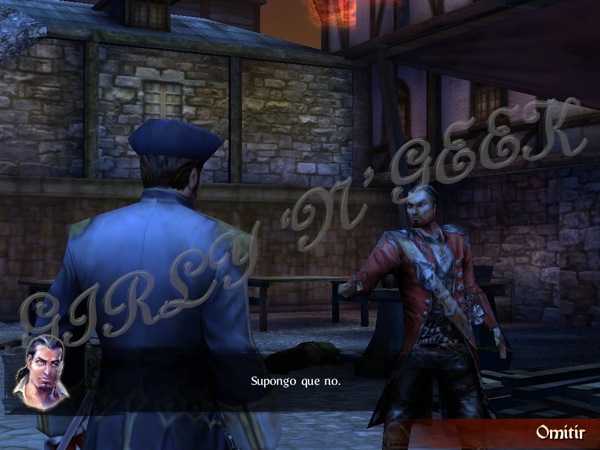
Backstab ios 1

The technicals

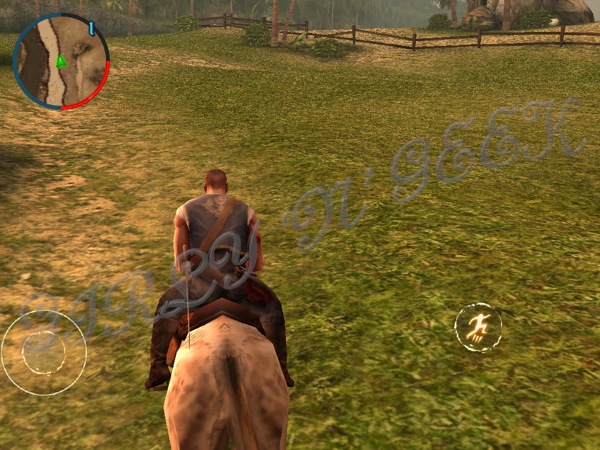
Backstab presents us with great graphics, while still having a fluid gameplay. Indeed while playing on the iPad I just though I have no reason to buy a portable console.

The controls, consist of two virtual areas with four virtual buttons. On the left, the virtual area allows looking, on the right the four buttons control the interaction and combat functions and on the rest of the screen we control the movement with our fingers. This results a pretty good control scheme, that I got easily used to, and is present on other Gameloft titles.

The whole game contains conversational audio, always in English, with a big list of translated subtitles. However, at least in Spanish, the translations are not perfect, sometimes omitting important story details or using incorrect expressions.

Backstab ios 4

The story

The game starts with you impersonating Henry Blake, a british official in colonial times, being betrayed by your best friend.

Here starts the adventure to bring light to the conspiracy that brings you to jail, getting help from other betrayed commanders, smugglers and thieves.

In a very linear story, where quests must be done in sequence, secondary quests give you nothing but unusable money (best weapons are given free completing main quests) and a big lose of time, everything starts funny and interesting until the middle of the game, where you'll get easily bored of doing the same and same and same over again, and the story gets fucked up (ok, zombies!?).

Backstab ios 10

Gameplay

With the excellent Gameloft's control system, playing is easy, and well done, but there are a couple of things that soon make the game boring.

First of all the linear story. There is only a main quest at any time, when you finish it another new one appears. Secondary quests give mostly money, and some times objects.

Then combats, they can be distance (shooting guns) or close (handling swords), with some using ship cannons, but mostly you'll never use a single gun, and combats are so easy, I've seen myself rounded by more than 8 guards and receiving not a single hit. And in a single hour you'll have more money than you'll able to spend at all.

Continuing with an annoying IA, like so you're walking on the city and accidentally touch a guard, then you have all the city guards wanting to kill you, forcing you to use a safe house (and paying it).

And finally, a severe bug that makes your hits be counted as if you were a big box. In the above image, for example, in the ground there are spears that kill you on contact, upping and downing from the ground. If you walk near the hole, while the spears are down, so near that you're almost inside the hole but not in it, you'll die. This happens over all the game, making some stages a nuisance that will probably make you abandon the game for another day.

Backstab ios 9

Conclusion

This is an interesting game, with great graphics and a mediocre story. But the interest is soon lost, making it just a game for moments, when you have nothing else to play.

Graphics: 4.5 / 5
Sound: 4 / 5 
Gameplay: 3 / 5
Quality/cost: 3.5 / 5

Overall score: 3.75

Tuesday, July 5, 2011

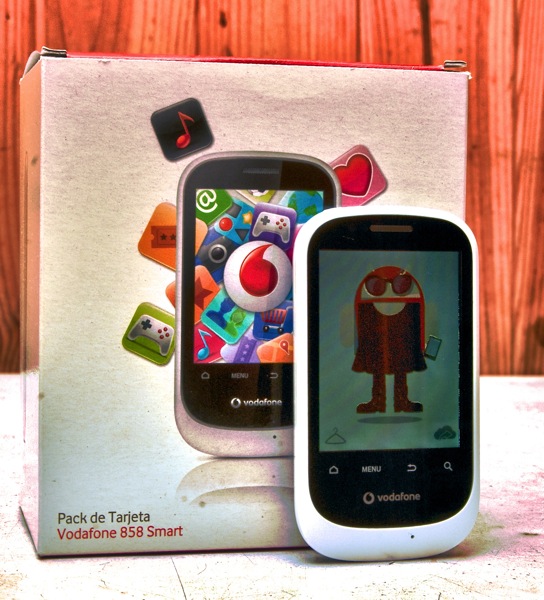
Vodafone 858 Smart (Huawei U8160)

Vodafone 858 Smart

Recently Vodafone launched the Vodafone 858 Smart pre-paid Android smartphone for 60 €, with 12 € in calls and free internet connection until August 31, 2011. So I run to the nearest Vodafone shop and got my first real Android device (previously I only played with the emulator and iDroid).

Technical specifications:

Manufacturer: Huawei
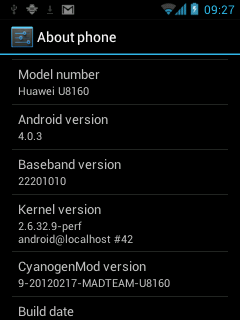
Model: U8160
Operating System: Google Android 2.2.1 (Linux kernel 2.6.32.9)
Processor: Qualcomm MSM7225 @ 528Mhz with dynamic underclocking, ARMv5 instruction set
RAM: 256 MiB (180 MiB accesible to applications)
Storage: 64 MiB internal flash, microSDHC slot
Display: 2.8" multitouch at 240 x 320 pixels driven by software (after having triple-checked, this phone contains no separate GPU unit, using Software OpenGL and 2D framebuffer).
Wireless networks: GSM (900, 1800 and 1900 Mhz), UMTS (2100 Mhz), Bluetooth 2.1 + EDR and WiFi 802.11 (b, g and n)
Ports: 4-pin 3.5mm miniJack, microUSB-B 2.0
Sensors: Temperature, digital compass, accelerometer, FM receiver, A-GPS, photometer, proximity
Camera: 1.9 Mpx, fixed focus, no zoom, no flash
Included accessories: USB charger (5V, 400mA), headphones (with microphone and a button), three different colors backcovers (white, lime yellow and light purple)


The system:

While this phone does not include the lastest version of Android, it includes a pretty new one that will allow a huge bunch of the Android Market to be used.

The system feels pretty fast, but if you install too much applications (I got 109 on the first day) it will start to do really crazy things, like automatic restarting, taking more than 15 minutes to list the installed apps, so on. Just don't install anything you don't really need and it will go fine.

There are however some limitations you have to take account into, that will be described below.


Bundled applications:

Appart of the applications usually bundled by Google with any Android phone, Vodafone includes a little bunch of applications on their own, including a Formula 1 one, a propietary application shop (an irony considering by default it is disable to install things outside official Market), a music shop and an updater for their own applications.

They are capped to not work under Wifi connections, so you'll probably never use them.

There is also an application for the FM Radio that does its job pretty well, with automatic channel searching and RDS support. I suppose it's the same on all Android phones with a FM receiver by the way.


Performance:

In this particular Android model, the Java runtime limitations appear quite clearly (Dalvik). Just a little number of applications installed will make the system run out of RAM really fast, making it feel like a turtle walking over hot tar.

The browser feels just enough, and Adobe Flash is not available (due to missing features of the processor, if you install it forcedly it will simply crash the browser instantly). Also the lack of multitouch and the small screen makes browsing not desirable (or reading eBooks).

When it comes to games, even the simplest 2D games of the Android Market (like Angry Birds), simply are unplayable, so not to say forget about 3D ones.


Sensors:

The phone includes a big bunch of sensors, but not so many applications to use them.

The assisted GPS is pretty slow finding satellites while on clear sky (more than 5 minutes), and the accuracy is low. I tried it one night of walk using the RunKeeper application to track me, with the phone in one of my pockets and the resulting data was as if I were doing zig-zags on the street.

If you want to use the digital compass you'll need to download some application from the Market, but forget about it, it's absolutely unusable. After dozens of calibrations, it still shows the same error of 130 degrees. When pointing to 0º N it thinks I'm pointing it to 135º SE. And if I rotate the move clockwise, the sensor does not detect the rotation, staying always as pointed to SE or S.

The temperature sensor also needs an application to use it. I tried AndroSensor, but it always says "Waiting for Event", so I don't even know if it works at all.

The FM receiver however it's the most accurate of all, being able to find all broadcast radios on my city inside a building. The bad thing is that it requires the headphones to be connected, as they act as the antenna, but this is not a problem as mostly you'll want to use both at the same time.


Network performance:

The phone supports all the known GSM/UMTS data network variants (CSD, GPRS, EDGE, UMTS and HDSPA) and almost all the GSM/UMTS frequencies, so you'll almost never get out of options (but CSD is not enabled by default, it's slow, expensive, not included in data plans, just forget this archaic technology)

The reception is pretty good, and the data speed is really decent. Things change when using Wifi. While it supports up to 802.11n protocol (that should be more than 108Mbps), all tests concluded with it being 10 times slower than the other devices tested (the router is 802.11g). Anyway, it is still faster (and cheaper!) than using GSM/UMTS.

Bluetooth speed and performance is excellent in all the cases.

The phone supports tethering via USB, Wifi or Bluetooth. I don't know if it's included in the bundled data plan, but at least you won't need to make tricks, roots, or custom ROMs to enable it.


Camera:

IMG 20110705 030039

The included camera sports a 1.9 megapixel sensor with unknown focal length (if you know please tell me), fixed focus, no optical zoom and no flash of any kind.

The automatic white balance works quite well, and offers up to 2.8x of digital zoom, but the level of noise in the camera is so high that when using the digital zoom the photo is all noise.

The dynamic range is very slow, getting pale colors and easily overexposing or underexposing details. Also the sensibility is very poor, being unable to get any photo under the light of a candle (not even the candle itself, only the flame that gets overexposed).

Also the focus point is set very far of the camera (more than 5 cm / 2 inches), disabling the ability to take near photos, and probably making useless any barcode scanning software you can imagine (I tested a few and none worked).

Finally it gets lens flare quite easily, so put your hand over the phone always when in direct light.


Multimedia:

The music player works quite well and flawless, but the integrated speaker (monoaural) is a pain in the ears. Luckily the included headphones sound good and are comfortable.

For videos, the screen is too small to watch a movie (get a tablet!), and the performance when playing anything higher than 360p drops out dramatically. Even a simple 480p video from Youtube gets framedrops.


Syncing:

There is no included CD on the package so you'll think at first something will appear when you connect the phone thru USB to the computer. And it does.

A virtual CD appears called "Mobile Partner", but don't expect any kind of software there, just a driver for developers, that doesn't even work (a bug in the installation file prevents it from working unless modified). If you are not a developer, forget it at all, I have not named it, erase it from your memory. period. If you are a developer you can use the driver on Android's SDK webpage.

While you can always use the included 2 GiB microSD card to put the music and videos and photos you want in any kind of disorder you prefer, and let Google sync the contacts and calendars using your GMail account, probably you'll want something more automatic.

So, as nothing is bundled to do that by Vodafone, we should go to the manufacturer directly.

If you are a Windows user you're lucky, because the manufacturer's software, Hi Suite, only available for Windows, is free, and allows syncing everything we can imagine, from applications to SMS, from contacts to Android updates (none available yet), and even backup the whole device, using the USB cable or over Wifi.

If you are however a Macintosh user, you're not so lucky. The only free option is DoubleTwist but it only works for multimedia. However for US$39.95 you can get Missing Sync for Android (Windows version also available) and sync everything the official suite does on Windows and more (no backups or updates, but...). It supports syncing via USB, Wifi and even Bluetooth.

In any case don't use two (even less three) syncing applications at the same time. Because of design decisions of Android, all of them will stay running in background (taking RAM, CPU power and battery) waiting for a sync to be requested.


Conclusion:

Ok I think I've not forgotten anything.

This phone is of course not state-of-the-art, however it's a really bargain for that budget, and in my opinion an ideal for one starting with smartphones (that in time will feel the need to migrate to a bigger thing, like an iPhone, a Galaxy, so on).

If you're a developer wanting to start developing for Android this is an ideal, as you'll learn (by the hard way) to optimize your applications, and your budget won't be affected at all.

Also if contracts made you tremble in fear, this is the best way to get a smartphone without signing hundreds of contract while thinking your soul is being sold at the same time.

However if it's not your first smartphone at all and your budget allows you to sign contracts or spend money, get anything bigger, even if you come from something as old as an iPhone 2G or a Nokia N70, this phone will make you feel being stepped back.

Also if you are searching for a cheap phone to go to places dangerous to your more expensive ultra new one, this is the ideal choice.

UPDATE: The phone is multitouch, the included operating system disables that.
UPDATE: You can install Android 4.0.3 (Ice Cream Sandwich) if you're brave enough, follow my guide here.