In 1983, Apple launched the Lisa computer, one of the first personal computers with a graphical user interface, setting up the first stone to user interfaces as we know them today.
On 24th December 2017, Al Kossow announced he recovered the source code (that is, the computer code used to create the Lisa operating system and user interface), using the DiscImageChef tool.
What is DiscImageChef?
DiscImageChef is a multifunctional manager for all kind of dump images of computer storage. It can do the most common functions usually done with dumps of floppies, hard disks, optical discs, etc. It also allows dumping such media to images.
What was the function of DiscImageChef in the Lisa source code recovery?
One of the functions of DiscImageChef is, for supported filesystems, to extract the contents of a dump. And in the case of the Lisa, DiscImageChef is the only tool supporting its filesystem thanks to my reverse engineering of it.
Reverse engineering?
Yes, that is the process to analyze some software to learn its inner workings, to be able to document that, or to create another software that is interoperable with its documents. In the case of the Lisa filesystem, there was no documentation of it; it was only known that it had some structures called MDDF and S-Record, but there was no information about how those structures were formed. So for several years I studied all known dumps, and created lots of test dumps using Ray Arachelian's emulator, LisaEm. Then, through testing and analysis of these dumps, I finally got enough knowledge of the Lisa filesystem structures to be able to add support for it on DiscImageChef.
So that's why you created DiscImageChef?
No, indeed, DiscImageChef started in 2011 as a personal tool designed to identify and show information about filesystems called FileSystemIDAndChk, that I used to check the integrity and correctness in my collection of operating system dumps. From that, it evolved organically. As dumps came in different formats, I added support for format plugins. In 2014 I renamed it the a more appropriate DiscImageChef. And from then on it has gained the ability of extracting files, creating dumps, comparing two dumps even with different formats, etc.
Why that name?
When talking about storage media, we say that their contents are raw when they represent what is in the media itself, while the contents are cooked when they contain only the data a user has wrote to them. And a chef is someone that takes a bunch of raw ingredients, and not only cooks, but makes magic with them. And disc image is because at first it was oriented for optical discs only, that by convention are spelled with C, contrary to other media that is spelled with K, as in disk. Also, "swiss army knife" is a term that's used so much, it has known became a common thing, losing its uniqueness. So join all, and you have The Disc Image Chef.
So, is it DiscImageChef or Disc Image Chef?
Both can be used. I just prefer to use DiscImageChef when no article is used, and separate when it is, like The Disc Image Chef.
And what can it do today?
Well, the last stable version, it can analyze, checksum, compare and verify 46 different image formats, identify 73 filesystems, list and extract files from 5 of them, and get information and create a dump from almost all devices, as long as they are attached to a ATA (aka IDE), Serial ATA, FireWire, USB, SCSI or SDHCI bus, from 3 of the major operating systems: Windows, Linux and FreeBSD.
Why does it not support macOS?
It does! The only thing it is not able to do is to dump media from a device connected to macOS. All the other functions work perfectly. The problem with macOS is that it doesn't allow any application to arbitrarily read devices attached to it; only from CD and DVD recorders. And I intend to add support for doing that soon.
So what's the future of DiscImageChef?
Well, for start I'm adding support for writing in any of the dump formats currently supported. That will allow people to convert a dump between two formats, or create a new dump from real media in their favorite format. The next thing I'll add is support for dumping floppies, with a standard floppy drive, or using one of the flux dumping hardware cards, like SuperCardPro, DiscFerret or KryoFlux. Also I intend to add the ability to list of extract for as many filesystems as possible.
Is a graphical interface coming?
Yes. I will add a graphical interface to DiscImageChef when all the other functions are stable. With barebones support for floppies, and only 5 filesystems fully supported, I feel it is not currently the time for adding a graphical interface. Also I'm pretty bad designing graphical interfaces, so if any designer is up to it, help is accepted.
About help, how many people work on DiscImageChef?
From time to time a collaborator sends new code, or someone asks for a feature, but it's mostly me alone, and I will be very grateful to have some help, specially when designing new parts of DiscImageChef, a little discussion of different ideas is always welcome.
To end, where can we get more information, or news, about DiscImageChef, or ask for a feature?
You can follow my work on Twitter, @DiscImageChef, or you can follow the project on GitHub, https://github.com/claunia/DiscImageChef.
Natalia Portillo,
31st December 2017
Showing posts with label mac os x. Show all posts
Showing posts with label mac os x. Show all posts
Sunday, December 31, 2017


Sunday, July 26, 2015
iTunes 12.2 or how they frack'd up iTunes...
The reason to be of iTunes 12.2 is the new Apple Music feature. You can like it or dislike it.
But under the hood, this feature introduced changes that basically, frack’d up iTunes in every way.
First of all, there is no more iTunes Match. While the service and the feature still exist and work, it’s no more listed as an option, in any menu.
There’s a new thing called “iCloud Music Library” that seems to supersede it. And I say that because, if you disable it, you’re disabling iTunes Match.
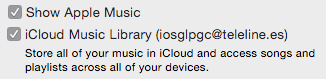
But enabling it enables something more than only iTunes Match, it enables a new way of removing songs from your iTunes Library.
Trying to delete a song from your library shows this new dialog.
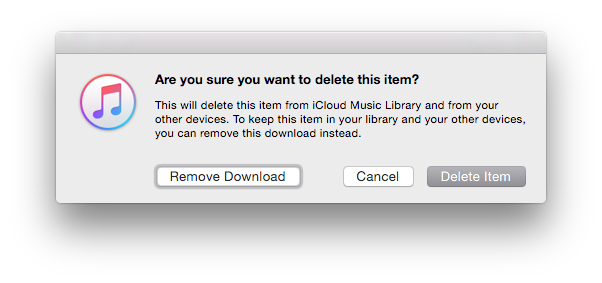 According to common sense seems that deleting the item should keep the file in your computer.
According to the explanation seems that removing the download will do that. Neither do.
“Remove download” means removing the file only, keeping the song in iTunes Match. “Delete item” removes it both from iTunes Match (sorry, the iCloud Music Library) and the computer.
But take care, because it can happen, even if you disable Apple Music, that the song converts, by itself, from “Matched” to “Apple Music”, and then downloading it will download a DRM’ed, encrypted copy, instead of the DRM-less song that iTunes Match provided before.
And while disabling the iCloud Library from the preferences returns to the old remove dialog,
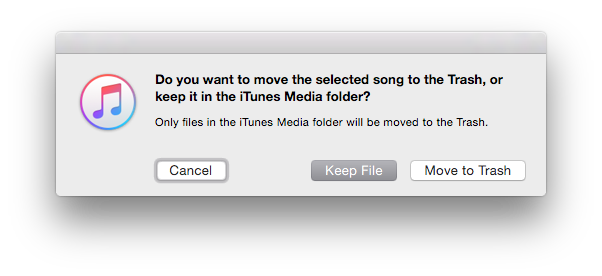
it only works when you select 9 songs or less at the same time,

showing this when you choose 10 or more,

A really confusing and alarming dialog that’s telling you it will remove all items.
Thankfully continuing will show the previous dialog where remove from library and from computer are different options.
Sincerely in my opinion this just frack’d up iTunes.
It’s not just trying you to consume Apple Music, it’s choosing from you. It’s choosing what you want to do with your files.
Time to search for another music manager it seems...
But under the hood, this feature introduced changes that basically, frack’d up iTunes in every way.
First of all, there is no more iTunes Match. While the service and the feature still exist and work, it’s no more listed as an option, in any menu.
There’s a new thing called “iCloud Music Library” that seems to supersede it. And I say that because, if you disable it, you’re disabling iTunes Match.
But enabling it enables something more than only iTunes Match, it enables a new way of removing songs from your iTunes Library.
Trying to delete a song from your library shows this new dialog.
According to common sense seems that deleting the item should keep the file in your computer.According to the explanation seems that removing the download will do that. Neither do.
“Remove download” means removing the file only, keeping the song in iTunes Match. “Delete item” removes it both from iTunes Match (sorry, the iCloud Music Library) and the computer.
But take care, because it can happen, even if you disable Apple Music, that the song converts, by itself, from “Matched” to “Apple Music”, and then downloading it will download a DRM’ed, encrypted copy, instead of the DRM-less song that iTunes Match provided before.
And while disabling the iCloud Library from the preferences returns to the old remove dialog,
it only works when you select 9 songs or less at the same time,
showing this when you choose 10 or more,
A really confusing and alarming dialog that’s telling you it will remove all items.
Thankfully continuing will show the previous dialog where remove from library and from computer are different options.
Sincerely in my opinion this just frack’d up iTunes.
It’s not just trying you to consume Apple Music, it’s choosing from you. It’s choosing what you want to do with your files.
Time to search for another music manager it seems...
Sunday, June 30, 2013
Hands-on: Mac OS X 10.9 Mavericks Developer Preview (up to DP2)

On 10th June 2013, Apple introduced the next major revision of their Mac OS X operating system, 10.9, and stopping with the tradition of naming them like big felines, this one gets called "Mavericks" like the surfing location on the state of California.
First impressions
At a first glance it seems that the design is being flatted a little, like what is happening to iOS 7. It's not as radical, there is still that metal theme along all the system, but for example, now the login screen has a single flat background color, and you can also notice it on the dock and the System Preferences window.

Maps

In last year's iOS iteration, Apple decided to break free of Google and put their own mapping solution. And this resulted in an ill-fated situation with an insanely high number of users complaining about the maps quality. In my own experience, it's as good as the others, and this means, all mapping solutions have huge errors. But I clearly welcome the change, as Google solution was limited compared to what they offered on other platforms, limiting the experience and putting Apple devices in a disadvantage.
This new Mac OS X iteration brings the Apple maps to the desktop, and while having the same errors (and corrections, because the maps are corrected server-side), it seems like a good idea.

While most of the times you will need the maps while on-move, you will also set routes, and search for places, in your desktop. And Apple though about that. You can share your share or route via Messages, saving it as a PDF, or, sending it to your iCloud-connected iOS device, so you just take the device, unlock it and start following Siri's driving directions.
Or walking! Because they also added support for walking directions (present also in iOS 7).

And finally you can get business information shown in separate windows with photos, open hours, so on, taking this information from Yelp. But for some strange reason, even if in all the places shown in the previous screenshots there are plenty of places registered in Yelp, it seems this functionality only works in the US.
What I miss from this application is the ability to download offline copies of the maps to be used internet-less and the support of GPS dongles, something that is easy to add and will make it useful for traveling people.
Calendar
Another place of visual overhaul is the Calendar application. No more trying to imitate a real-world one, it returns to the basics, showing a flatter interface with pastel colors that resembles Mac OS X 10.5's.

One of the simplest but most "why wasn't this here before" features is continuous scrolling. Using the touchpad you just scroll and scroll and scroll until you arrive the date you were searching. Simple, but powerful.
Another feature is the integration with Maps,

so you can add a place based on the real location, and see at a glance a minimap, and if near enough, a weather forecast (from Yahoo Weather).
Also you can use the travel time, knowing the exact location, from your current location. Only from your current location. Quite a limitation considering that you maybe going two places, one first, then the other, without returning home.
Also Facebook events will appear here.
Safari
Under the hood Safari gets faster, less memory hungry, and over the hood, it gets a "Shared links" feature.

"Shared links" shows you in the sidebar (while Apple says it's new, it was already there with Reading List, it's just got new features) all the links posted by the Twitter users you're following. Not a heartbreaking feature, but I find it quite useful.
You can also get a password generator for sites you're registering, that automatically saves your freshly created hard-to-remember password in the keychain. And from the keychain it can take and fill all the credit card data, but the verification code.
iCloud
iCloud's only new feature is the iCloud keychain, and yet it's not new. It was already present in MobileMe.

At least this time they're making it more secure. Instead of plainly syncing your keychain with any device that gets added to your iCloud, it will request authorization to an already existing device, or via SMS, or the newly added device will not get the keychain.
Multi-display
Not kind of a feature but a "this is how things should have worked", they corrected the ugly "feature" that blocked all but one of your displays in a multidisplay setup as soon as you were using a full-screen application from Mac OS X 10.7 onwards.
Also you can now use your Apple TV connected television not just as an AirPlay Mirror, but as another display.
Finder
Finder gets tabs, something power users like me will definitively like.
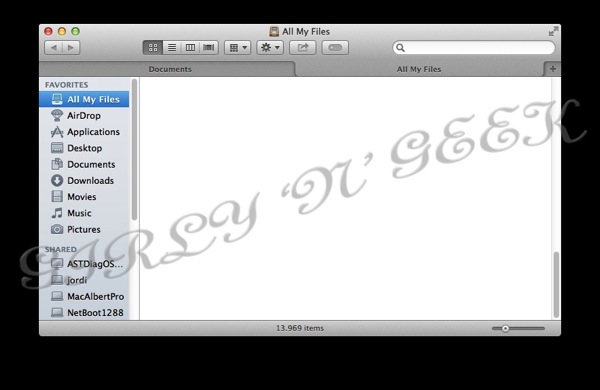
You can use tabs to have origin-destination windows for copying, to have all the places where a project's files are located opened in a single window, and you can drag&drop to the tabs themselves.

The other new Finder feature, is not exclusive to it, but a system-wide feature that gets easily managed thru Finder: Tags.
While at first glance it seems just like the good-old labels, things are only similar.

Tags are infinite, freely-named, labels. You can name them the way you want, assign a color, search for them in Spotlight, or you can create a Finder tab showing all files in the computer with that tag. And if you drag&drop files to the Tag window, all that files will receive that tag.

Last but not least, a file can have multiple tags at the same time.
Server
I've not been able to test Mac OS X Server 10.9 extensively, but it also doesn't have much to say. They add support for iTunes Store and App Store (the iOS one) to Caching Server, that in 10.8 only supported the Mac App Store. This will make caching servers need quite a lot more of disk space for iTunes-intensive workplaces, and be a huge bandwidth saver for iOS-filled ones.
Also they add support for creating Xcode building farms, something that Xcode already had in previous versions.
They still have not returned the ability to be an Active Directory server that they took away in 10.7.
Advanced internals
Compressed Memory
A simple concept, compressed memory compress the inactive memory, that is the one that can be swapped to disk, just because that's faster than copying it to disk, and makes it faster to be copied to disk

App Nap
With App Nap, applications that are just sitting idle (no I/O, no sound) are slowed down, or completely stopped, to preserve battery.
Apple promises up to 23 percent less battery usage, but considering that the most battery hungry process is usually Spotlight, it's yet to see.

Timer coalescing
This is a more complicated feature. Instead of letting all applications request and do anything the time they want, creating a lot of spikes of CPU usage/idle times, Mavericks will group all applications usage of the resources (timers) so they go in big usage/idle pieces, allowing the CPU to idle more, and so, save battery.
Other features
Other features introduced in Mavericks is a minor rework of Activity Monitor, including a new Energy tab and new stats and graphs, privacy controls for applications requesting to control the computer for accessibility (not just a system-wide "allow all" or "deny all" but fine-grained by app), support for LinkedIn accounts, automatic installation of updates (take care with restart-required ones, as this will restart your computer and applications not yet enabled for the document saving feature introduced in 10.7 will lose their changes), "Enhanced Dictation" (that is, offline, continuous and realtime, without sending your voice to Apple but doing it all locally), OpenGL 4.1 (finally, but still outdated), don't-play-till-you-want plugin in Safari (Flash ads, say goodbye), interactive and web notifications (couldn't test as none appeared), better iTunes HD playback efficiency, full iBooks support (reader, store, server's cache, nothing appeared in Developer Previews 1 or 2), and not much else. Oh, wait, yes, a heavily modified, color-changed, wallpaper of a sea wave, to be thought it was taken surfing on Mavericks ;).
Also to note is that the documentation says that SMB file transfer protocol will be the default. But, what's "default"? AFP is still supported, present, configured and enabled by default, not to say it's needed to use Time Machine over the network...
Conclusion
I like the new features. But I feel they're not enough.
They're not huge, life changing features like Mac OS X usually gives. They're not even so many as usual.
This feels more like a 10.8 Release 2, than a 10.9 system.
Also, I dislike "Mavericks", there're more big felines to be used, and using California places? No, I don't like it.
Finally I have taken a couple of benchmarks and 10.9 has been slightly slower and gave a lot less (more than 1 hour of difference) of battery duration than 10.8, but as this is a beta, not optimized, and full of debugging tricks, I will not publish the results.
Stay tuned till final release, this blog entry will be updated with every DP including changes, and differences, instead of creating a new blog entry per preview as I've always done before.
Wednesday, July 25, 2012
Hands on Mac OS X 10.8 Mountain Lion *Preliminary*

Today, just after the Q3 financial results presentation, Apple has officially launched Mac OS X 10.8, nicknamed Mountain Lion, and here it is, the hands on.
Differently from my other reviews I will do this one starting with installation and following the exact order and categories in the official Apple's feature list.
Installation
Like the previous Mac OS X (Lion), Mountain Lion is available through the Mac App Store, and unlike it, there will be no USB flash disk available from Apple for those that want to do a clean install, have it as a backup, etc. Price is reduced from Lion to $19.99, 15,99 €, £13.99, ¥1,700.
If you want to create one yourself, be it a USB flash disk or a DVD, you can follow the instructions I put for Lion, as they work the same (just use Mountain Lion installer), or use an automated application for that hassle, Lion Diskmaker from Guillaume Gète.
It is to be noted that any of the ways to install (be it directly from the Installer, the USB flash disk, the DVD…) Mountain Lion is able to update without problems systems with Mac OS X 10.6 "Snow Leopard" and Mac OS X 10.7 "Lion" conversing your preferences, applications, etc.
If you have any previous version, you will need to go to a physical Apple Store or to a friend's house and buy it (using your account, don't do piracy please), and then burn to USB or DVD. I have not tested this scenario so I don't know what happens with previous system versions when updating. You can, however, copy all of your files to another hard disk (I suggest you using Carbon Copy Cloner for that task) and then import that with the Migration Assistant that will be launched when installation is finished. This way guarantees your settings and files are conserved.
While Lion already left out 32-bit only (anything below a Core 2 Duo processor) Macs, Mountain Lion drops out any mac that needs 32-bit kernel extensions, leaving the list of supported Macs as follows:
- iMac Mid 2007 or newer
- MacBook Late 2008 (Aluminium), Early 2009 or newer
- MacBook Pro Mid & Late 2007 or newer
- Xserve Early 2009
- MacBook Air Late 2008 or newer
- Mac Mini Early 2009 or newer
- Mac Pro Early 2008 or newer (however, if you put a supported graphics card and modify the installer you can still unsupportedly install Mountain Lion)
It is important to note that if you're trying to buy Mountain Lion from the Mac App Store and you receive a "product is not available" and/or "Error 100" message, just wait a couple of minutes and retry, that is happening because of the intense number of users trying to buy it at the same time. And when you get it finally, the download speed will be surely slow. Things will get faster as time passes.
Accessibility
The accessibility feature gets overhauled moved to a categorized and easier to access preference panel, made accessible anywhere using Option-F5 shortcut and adding support for 14 new braille devices.

AirPlay Mirroring
If you have a second-generation Apple TV and any of the supported Macs (iMac Mid 2011 or newer, Mac mini Mid 2011 or newer, MacBook Air Mid 2011 or newer, and MacBook Pro Early 2011 or newer) now you can mirror anything you're doing in your Mac to your Apple TV.
This is pretty useful for presentations, allowing people to connect an ATV to a presenter and just use any Mac to put the Keynote slideshow, a QuickTime movie, or show a game! Just click the AirPlay icon on the menubar, choose which ATV of all found you want to use, and let's go.
Or you can go to the Sound preference panel and get the sound output to be your ATV.
Your Mac automatically downscales the resolution to 1080p (or you can choose it to be your Mac resolution so no scale happens) and encrypts the data so it cannot be intercepted on the network.
Auto Save
Enhancing the revision system included in Lion, you can now rename a file from the title bar.

You also get keyboard shortcuts for duplicate, and the save as option make a return for all of us that missed it.
Also you can move a document to iCloud, and any unsaved (aka "Untitled") document is automatically saved on iCloud just in case.
Built-in Sharing
Share, share everything, share everywhere, share with buddies, followers, the police (just kidding)!
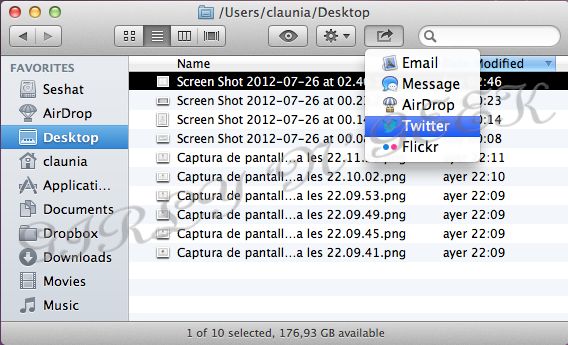
Finder can share by e-mail, iMessage and AirDrop, for pictures on Twitter and Flickr and for movies on Vimeo.
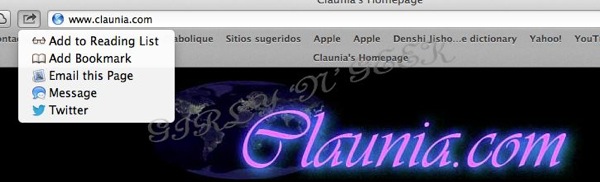
Safari can share to e-mail, iMessage, Twitter and also add as a bookmark or to the reading list.

QuickTime Player X can share to e-mail, iMessage, AirDrop, Facebook, Youtube, Vimeo and Flickr. Choosing a video on Finder does not give so much options, so you are forced to open the video first on QT if you want to share on YouTube or Facebook (to be added system-wide on Fall).
Unfortunately, contrary to Windows 8 xxxx and Android Intents, application developers cannot enable destinations for the sharing function.
Calendar (the application previously known as iCal)
Calendar gets a new sidebar listing all of your calendars, offers search suggestions, gets a new date picker and moves the notifications from the old centered alert message to the Notification Center.
Contacts (the application previously known as Address Book)
Groups are moved to a new column, repeated contacts from different services (Yahoo!, Twitter, Gmail, iCloud, etc) get automatically joined and shown in an unified view, and you can share contacts in vCard via e-mail, iMessage and AirDrop.

Dashboard
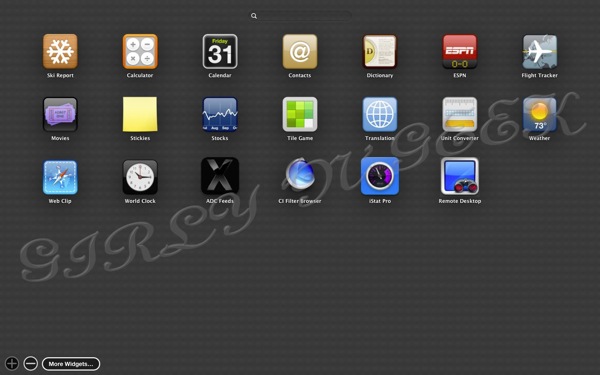
Now when you go to add a new widget, the widget lists is full screen, similar to Launchpad, includes a search field and supports the creation of folders.
Dictation
From the worlds of iOS, half a Siri has become.
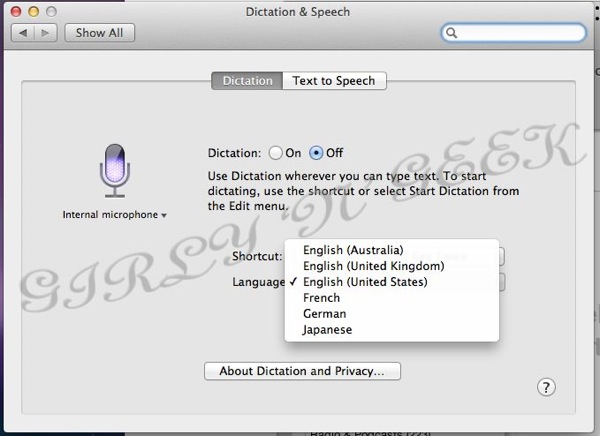
Using the same voice recognition engine introduced with Siri for the iPhone 4S, now you can dictate anything on your Mac. For now, only English (AU, UK and US), French, German and Japanese are supported. And the same way as in Siri, your voice is transmitted over internet to Apple datacenters for recognition, something illogical considering that Macs are perfectly capable of running the recognition by themselves.

It supports basic commands like "all caps" and "new line", and autolearns. But unlike Siri, it does not give you any information or search but simply writing in text boxes (also, unlike Siri, any application's text box is supported).

And that's supposed to be "This is the new Mac OS X dictation, it only supports English, French, German and Japanese".
The real issue is that until all the sentence is dictated, sent, processed and incorrectly converted to text, you cannot see the failures, making you lose so much time correcting it that in some situations (or until Si… I mean, Dictation learns your exact accent).
Dictionary
Now Dictionary adds support for Simplified Chinese, Spanish and German.

Dunno about German or Chinese, but for Spanish using the Vox's dictionary instead of the Royal Academy (RAE) one does not give the official language definitions.
In fall, Mac OS X 10.8 will add system-wide support for Facebook, including posting to the wall, reading your wall on Notification Center, sharing and syncing Facebook contacts on Contacts.
But till then, no trace of Facebook.
China

Apple is currently having a huge grow on the chinese market, and Mountain Lion includes a great list of improvements for it. However most of them only show when you're using the system in chinese, or setting your location as China.
Among them, there is a improved text input for Simplified and Traditional Chinese, dynamic word lists that update automatically from internet, fuzzy Pinyin input, autocorrection, better handwriting recognition, automatic saving of your Pinyin user dictionary on iCloud, Emoji and facemarks, support for the Sina Weibo microblogging service system-wide, as well as for the Youku and Tudou video sites, Baidu search in Safari, support for QQ Mail, 126 and 163 mail services and new and improved fonts.
Finder

Finder includes a couple of small but appreciable changes. Apart from the previously mentioned sharing, the most useful new feature is that when you're doing a copy a progress bar appears in the destination folder as well as a small cancel icon.

Now you can also encrypt any volume using Finder, just double click it and choose encrypt (that is, FileVault 2 is no longer restrained to the boot volume), without the need to use Disk Utility or Terminal.
A small novelty is that you can open Quick Look not just pressing space, but also tapping on the trackpad with three fingers.
Game Center

Game Center comes to the Mac, with all the features from iOS. It also supports cross-platform (iOS-MacOS) games, both for just achievements and leaderboards as well as for multiplayer gaming.
Something not included in iOS' Game Center is in-voice chat.
Gatekeeper
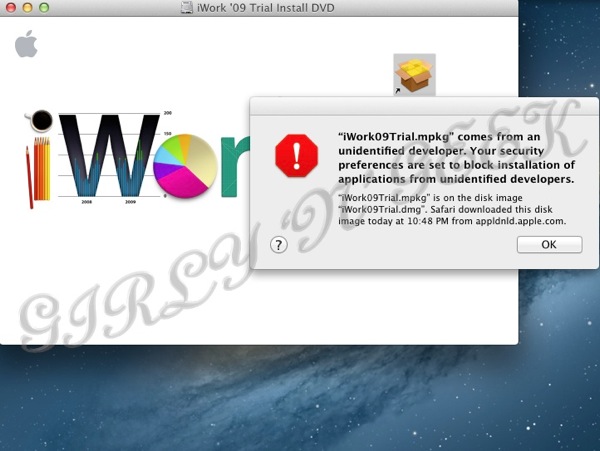
Probably, the most controversial feature from Mountain Lion. Gatekeeper is a protection that allows the system administrator to choose which applications can be installed and run.

By default, the configuration only allows applications coming from the Mac App Store (that is, controlled and inspected by Apple to prevent them from doing nasty things to your system) or signed by an authorized developer (one that pays Apple for a developer certificate, so in case that an application does a nasty thing it can be revoked). You can change the default to allow only applications from the Mac App Store, or from Anywhere.
In the case you're an administrator, pressing the Option key while you open/install it asks you for a confirmation in case the application does not fall under the current setting.

Personally, I see this as a good move, because it lets administrators the same power as before, while moving users to a safe default that helps preventing malicious software from spreading easily.
TO BE CONTINUED...
Sunday, February 19, 2012
Hands on Mac OS X 10.8 Mountain Lion Developer Preview 1
In a press release that surprised us all, Apple announced the availability of Mac OS X 10.8 (dubbed "Mountain Lion", another kind of Puma, or the North American Panther) Developer Preview 1, for all Macintosh registered developers.
Less than a year after Mac OS X 10.7, this new operating system promises to include more than 100 new features, include more iOS improvements and designs, and be available to general public on "Late Summer 2012". No price information has been disclosed, but included strings suggest that it will not be free.
As this version includes some installation bugs, I'll dedicate a section specially oriented for installation.
Installation
Like Lion, Mountain Lion comes in a Mac App Store package. If you want to burn it to a DVD or to an USB, the procedure is the same as in Lion.
However, there is currently a bug in Mountain Lion installation, and when you install to a blank drive, something most developers will try, you'll find that there is no post-installation, and you get greeted with:

Don't try, it's not asking for a Mac OS X Server account, neither for a Lion account on another drive. It won't ask to create a user, and there is no user, so you cannot login. Funny, eh?!
So what to do? Install over the same drive that already has a Lion (update). So if you want to install on a new partition, install Lion there first.
It is able to update 10.7.0 (not tested 10.6) and it works flawlessly on VMware Fusion 4.1.0 or up, including VMware Tools. Don't try a previous version of VMware, the SCSI controller has some kind of bug and Mountain Lion is unable to found any drive.
If you install over Lion, it will ask for an Apple ID and the current timezone. Any new user you create will be asked for his/her Apple ID at first login (or to create a new one).

If you supply an Apple ID, it will ask to setup iCloud, and Find My Mac. However it's not completely setting it up as promished (iTunes and Games Center does not get set up, however contacts, calendars, bookmarks, Mail and the App Store get it).
Settings
There is one new setting "Notifications" that I'll explain below, and a few minor changes.
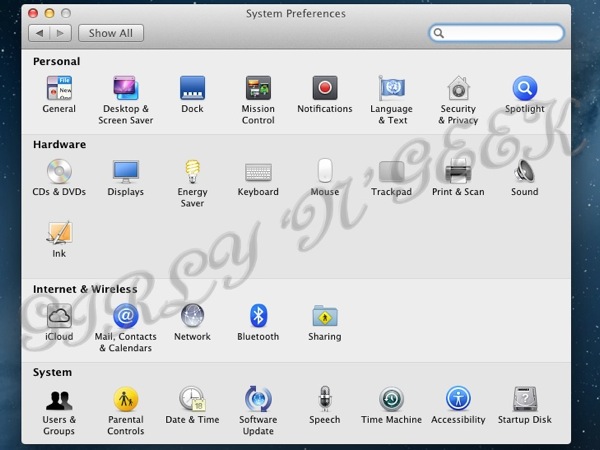
Accesibility gets moved to System (again).

For wallpapers, we lost the option to make the menu bar translucir, and we get a new default wallpaper, not just another galaxy, but the Milky Way Galaxy (it's where planet Earth, and then, most probably you also, is located). If you're not from Milky Way Galaxy, please leave a comment with your stargate coordinates ;)

For screen savers, the preference panel also gets a cosmetic change, with Slide Shows in a better category. There are only two screen savers (compared with 8 in Lion) and we lost the option to change it randomly :(

In Language & Text we get eight (8) new system-wide translations (Catalan, Greek, Hebrew, Croatian, Romanian, Slovak, Thai and Ukrainian), as well as support for the Chinese Lunar calendar.
In "Mail, Contacts & Calendars" (it should be named internet accounts or something else), we get new services: twitter (however my twitter account did not work), flickr, vimeo, and for the chinese, QQ, 126 and 163. Also Google accounts now get Notes synced, but no connection to YouTube (Google's equivalent to vimeo, supported under QuickTime, iLife and Aperture) or to Picasa (Google's equivalent to flickr, not supported in any Apple app by default).
Also iCloud now gets the option to syncronize Notes and computer User Accounts, so if your user is an administrator, all the accounts on that machine get created on all other machines. This is, in my humble opinion, quite useless considering iCloud is single-user.

In Security & Privacy you can configure Gatekeeper (the "Allow applications…", I'll explain it below).

Oh oh, where's Web Sharing!?!?!?! Dunno, but Apache is still installed and launched :S

In Date & Time, timezone can be set automatically depending on your current location. This, on desktop macs with no wifi connected, does not work (neither other location service), and personally I think that sending your wifi's MAC address (unique identifier for your router or access point) to get your current location is not so much private.
Accessibility gets a major overhaul, making everything more categorized, separated and cleaner, but no new options here.
So, it's time for "new things"!.
Notifications
If you're a Mac user, you probably have seen notifications from Skype, Outlook, or directly, you have Growl installed for that. Now, Apple includes a notifications system, taken directly from iOS.

A new circle with a circle icon right top of the screen, next to Spotlight, allows you to see the stored notifications. You can also access it with a swipe on your trackpad.

In settings you can set up, like on iOS, from what applications to get notifications, which kind (none, banner or alert), how many, with sound, sorted manually or by date, so on.
Messages
With iOS 5, Apple introduced iMessage, a new system that allows to send text, images and videos between any iOS device (iPod, iPad, iPhone) using your phone number and/or your Apple ID (iCloud)
Now, in Mountain Lion, iChat disappears, gets renamed to Messages, and gets support for iMessage.

That's me talking with my mom and a couple of friends (all of them with iPhone) over iMessage. I can continue the conversation (receive my messages and theirs) on my iPad and iPhone, however it only beeped on Mountain Lion, so it's not so annoying.
One thing I missed is direct access to emoji on the computer, but messages sent with them showed correctly.
You can get a beta version of Message for Lion from Apple, but take care, it deletes iChat and you can lose all ability to chat when Mountain Lion arrives!
Notes
Of course, Notes is not new, but here it gets more than an overhaul.

It is now, an independent application, and not just a list of lost items inside Mail. HOORAY!
That's really important when you have hundreds of daily mails like I do, and finding a note inside Mail is simply impossible.
Reminders

Reminders, the iOS 5 To-Do list, gets ported to Mac OS X, and gets the data from iCloud syncing :p
Share sheets
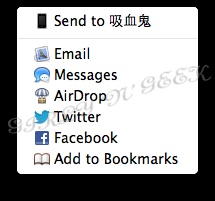
Share sheets is that little menu on iOS to share things by mail, message and twitter. And now, it gets in Mac OS X, for any account you have configures, for almost any content (webpage, text, photo). There is an icon in Safari, another in file dialogs, and even if you right click on an image inside of Safari, you get the options.

This is sharing a website on twitter, snapshot included automatically.

This is sharing the same website on Messages.
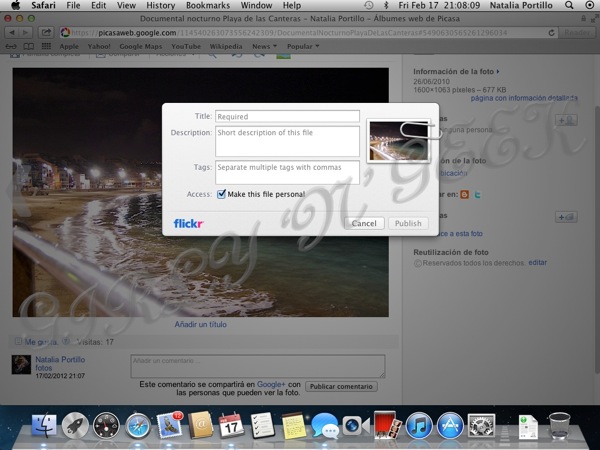
Sharing a photo from my Picasa album on flicker.
Available destinations depend on selected content (vimeo doesn't support photos, twitter doesn't support videos, so on).
Safari 5.3
More speed, better compatibility, ok these are the usual things.
As you've seen up, Safari gets share sheets, one next to URL (for sharing the web with a snapshot) and the other sheet in contextual (right-click/ctrl-click) menu.
Also, as you can appreciate in the previous screenshot, there is no more search bar.

Now, the address bar includes options for searching, in your default search provider (Google is the default first time), on your bookmarks and history, or on the current page.

Also you can get the list of website user and passwords stored, without having to go to Keychain Access.

And when you login on a Google account, you get asked to add it to your system accounts.
Game Center
Game Center is another thing that comes from iOS, and while currently no Mac game can be present on the App Store with support for Game Center, it detects any iOS game with a Mac version, and shows their options and achievements.
Gatekeeper
Gatekeeper is probably what will be the most criticized function on Mountain Lion.
Gatekeeper allows you to set up, in Security & Privacy, what applications are allowed to be installed and run in Mountain Lion.
Options are three:
Only applications that come from the Mac App Store. These applications are signed by Apple, and checked that they don't do something they shouldn't (breaking your computer, for example).
Only applications that come from the Mac App Store or applications signed by identified developers. Identified developers are those who pay $99/yr to Apple and sign their applications. This is the default option on Mountain Lion, and provides you with security without much trouble.
Any application. This is how any previous version of Mac OS X works.
Very informative message, curiously it's from an Apple application.
However if you're an administrator, you can bypass the security settings by a one time option. Right click (or ctrl click) the application or installer, choose open, and:
Now you can force open it, and it will never ask again for that exact application or installer package.
Other little things
Supported applications (none currently, future iWork betas will) can access iCloud as if it was a disk, with a file dialog and the ability to create folders.
Address Book gets renamed to Contacts.
There is no support to ATI X1000 cards or to nVidia NV40. Also support for Intel GMA950 is dropped.
There is a new driver called "Apple Thunderbolt Audio". Thunderbolt until now presented everything over HDMI (audio included) or PCIe (an audio controller can be connected there), but this new driver, it is here, and I don't quite know what device it refers to.
Xgrid support vanished.
Rumors say, X11 is dropped, Carbon is deprecated. There is no official notice about Carbon deprecated, it is still there. X11 gets the same treat as Java. Trying to open it directs you to a download page, however, this is better. Lion 10.7.3 X11 version is older than the download page one, and as X11 is not something all users need, it's not so much of a problem here.
If you have an Apple TV, the system will detect it and offer you to broadcast your current screen to your Apple TV (this is called AirPlay). However I couldn't test this feature because I have no Apple TV.
For developers
There are a few changes in frameworks, both public and private.
New public (usable by ANY developer) frameworks: Accounts, AudioVideoBridging (AirPlay), CFNetwork, CoreText (it's not new, but now it's independent), CoreWiFi (includes functions to handle WiFi connections and cards, with some low level values), EventKit (for Notifications), GameKit (from iOS, for Game Center features), GLKit (from iOS, handles OpenGL, supposedly easier to use than AGL), MediaToolbox (video output and acceleration, audio and video formar handling, colorspace conversión, so on), SceneKit (was private in Lion, renders 3D scenes and objects from Collada files) and VideoToolbox (encodes and decodes video).
New private (sable ONLY by Apple) frameworks: AccountsDaemon, CalendarAgent, CalendarAgentLink, CalendarFoundation, CommsDiagnostics, CoreMessage (iMessage), CoreRecognition (see below), DeviceToDeviceKit, DeviceToDeviceManager, GameKitServices, GeoServices, GPUSupport, IMAP (used by Notes, an implementation of the IMAP mail protocol), MediaControlSender, MessageProtection (for iMessage), MMCSServices, NetFSServer, Notes, OAuth, ODServerTools, RemoteWebInspector, ShareKit (for the Share Sheets), TimeSyncKit, XPCObjects.
From the private frameworks I've discovered three things:
1.- iMessage goes encrypted with OTR system.
2.- There is a new feature for updating firmware over USB or Bluetooth, but this framework only shows Mac models and not iDevices. It is clearly called DFU.
3.- CoreRecognition recognizes faces using integrated webcams. There is nothing currently using this in DP1, but this can be useful for login using a recognition of the user's face :p
Subscribe to:
Posts (Atom)