In 1983, Apple launched the Lisa computer, one of the first personal computers with a graphical user interface, setting up the first stone to user interfaces as we know them today.
On 24th December 2017, Al Kossow announced he recovered the source code (that is, the computer code used to create the Lisa operating system and user interface), using the DiscImageChef tool.
What is DiscImageChef?
DiscImageChef is a multifunctional manager for all kind of dump images of computer storage. It can do the most common functions usually done with dumps of floppies, hard disks, optical discs, etc. It also allows dumping such media to images.
What was the function of DiscImageChef in the Lisa source code recovery?
One of the functions of DiscImageChef is, for supported filesystems, to extract the contents of a dump. And in the case of the Lisa, DiscImageChef is the only tool supporting its filesystem thanks to my reverse engineering of it.
Reverse engineering?
Yes, that is the process to analyze some software to learn its inner workings, to be able to document that, or to create another software that is interoperable with its documents. In the case of the Lisa filesystem, there was no documentation of it; it was only known that it had some structures called MDDF and S-Record, but there was no information about how those structures were formed. So for several years I studied all known dumps, and created lots of test dumps using Ray Arachelian's emulator, LisaEm. Then, through testing and analysis of these dumps, I finally got enough knowledge of the Lisa filesystem structures to be able to add support for it on DiscImageChef.
So that's why you created DiscImageChef?
No, indeed, DiscImageChef started in 2011 as a personal tool designed to identify and show information about filesystems called FileSystemIDAndChk, that I used to check the integrity and correctness in my collection of operating system dumps. From that, it evolved organically. As dumps came in different formats, I added support for format plugins. In 2014 I renamed it the a more appropriate DiscImageChef. And from then on it has gained the ability of extracting files, creating dumps, comparing two dumps even with different formats, etc.
Why that name?
When talking about storage media, we say that their contents are raw when they represent what is in the media itself, while the contents are cooked when they contain only the data a user has wrote to them. And a chef is someone that takes a bunch of raw ingredients, and not only cooks, but makes magic with them. And disc image is because at first it was oriented for optical discs only, that by convention are spelled with C, contrary to other media that is spelled with K, as in disk. Also, "swiss army knife" is a term that's used so much, it has known became a common thing, losing its uniqueness. So join all, and you have The Disc Image Chef.
So, is it DiscImageChef or Disc Image Chef?
Both can be used. I just prefer to use DiscImageChef when no article is used, and separate when it is, like The Disc Image Chef.
And what can it do today?
Well, the last stable version, it can analyze, checksum, compare and verify 46 different image formats, identify 73 filesystems, list and extract files from 5 of them, and get information and create a dump from almost all devices, as long as they are attached to a ATA (aka IDE), Serial ATA, FireWire, USB, SCSI or SDHCI bus, from 3 of the major operating systems: Windows, Linux and FreeBSD.
Why does it not support macOS?
It does! The only thing it is not able to do is to dump media from a device connected to macOS. All the other functions work perfectly. The problem with macOS is that it doesn't allow any application to arbitrarily read devices attached to it; only from CD and DVD recorders. And I intend to add support for doing that soon.
So what's the future of DiscImageChef?
Well, for start I'm adding support for writing in any of the dump formats currently supported. That will allow people to convert a dump between two formats, or create a new dump from real media in their favorite format. The next thing I'll add is support for dumping floppies, with a standard floppy drive, or using one of the flux dumping hardware cards, like SuperCardPro, DiscFerret or KryoFlux. Also I intend to add the ability to list of extract for as many filesystems as possible.
Is a graphical interface coming?
Yes. I will add a graphical interface to DiscImageChef when all the other functions are stable. With barebones support for floppies, and only 5 filesystems fully supported, I feel it is not currently the time for adding a graphical interface. Also I'm pretty bad designing graphical interfaces, so if any designer is up to it, help is accepted.
About help, how many people work on DiscImageChef?
From time to time a collaborator sends new code, or someone asks for a feature, but it's mostly me alone, and I will be very grateful to have some help, specially when designing new parts of DiscImageChef, a little discussion of different ideas is always welcome.
To end, where can we get more information, or news, about DiscImageChef, or ask for a feature?
You can follow my work on Twitter, @DiscImageChef, or you can follow the project on GitHub, https://github.com/claunia/DiscImageChef.
Natalia Portillo,
31st December 2017
Showing posts with label lisaem. Show all posts
Showing posts with label lisaem. Show all posts
Sunday, December 31, 2017


Tuesday, April 19, 2011
IDEFile to Disk Copy 4.2 conversion
For a while I've been searching for any Twiggy disk image from an Apple Lisa 1 computer, if possible of the Lisa Office installation disks and its applications. However I've had no luck at all.
One day I found on YouTube a video of a guy repairing his Twiggy floppy drive, and I asked him for images. Unfortunately he did not have any, but sent me an image that he used for booting, using the IDEFile adaptor on his Lisa 1.
The image is not in Disk Copy 4.2 as expected by any of the emulators (LisaEm or IDLE), but seemed a simple dump of the 532 bytes per sector disk (yeah, Lisa uses 532 bytes per sector instead of 512, but that's another history).
I checked the image with a hexadecimal editor and saw that the first 20 bytes are the tags for the sector and the remaining 512 bytes are the data of the sector. So I started to create a simple converting tool that read the tags, and the sectors, and using libdc42 from Ray Arachelian, created a Disk Copy 4.2 image with the same data.
However when I checked the sectors of the DC42 image, and checked it on lisafsh-tool (from LisaEm too), they were out of order.
It was time to sleep, and in my dreams I started thinking about interleaving.
The day returned and I went on the work, checking the correct order for the sectors, I saw that indeed there was some kind of interleaving on the IDEFile image.
Sector 0 become 0 on IDEFile, 1 become 5, 2 become 10, so on.
After checking 64 sectors I saw that the sequence was always [0, 4, 8, 12, 0, 4, 8, -4, 0, 4, -8, 0, -12, -8, -4].
It was then a simply math modulus of the expected sector and 16 to get the exact offset inside that sequence, adding it to the expected sector and getting then the IDEFile sector. Multiplied by 532 gives the exact byte offset where to start reading.
I added that piece of code to my little tool, and converted the IDEFile image again to DC42.
Trying to boot it with LisaEm (romless) just made LisaEm enter in an infinite loop.
I booted LisaEm in Lisa Office 3.1 and inserted the converted image as an alternate profile, configured Lisa Office to see that profile, rebooted and voilá!

Lisa Office 3.1 recognized the disk as from an older Lisa OS version. You MUST read it very carefully, because the dialog is practically the same as when you insert an uninitialized disk. I clicked "Update".
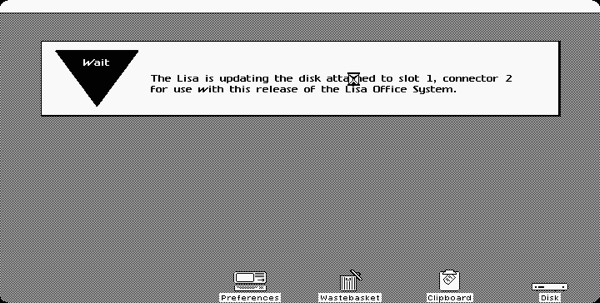
Waited for 5 minutes and...

Here they are, the contents of the IDEFile image as seen by LisaEm :p
Just of curiosity, I checked out the attributes of the disk.

As you can see, the filesystem version is 14 (0x0E), the same used by Lisa Office 1 and Lisa Pascal Workshop 1.
So the update is not updating the filesystem structures, just the Lisa Office on disk structures.
I've made the source of my utility under the BSD license, that is compatible with libdc42's GPL license, and published it in this link.
From what I've read on IDEFile's webpage it stores more than one image on the hard disk using some "partition" scheme, but I don't know how to extract individual images from them unless I get a whole dump.
Subscribe to:
Posts (Atom)